Table of contents
Open Table of contents
Introduction
We live in an exciting time in log-based threat detection. Now, more than ever, organizations have the ability to not rely just on alerting from security products, but to write their own rules to detect the threats that they care most about. Modern SIEMs are very good, if very expensive. Parsing, formatting, and querying telemetry to detect threats across all manner of sources has never been easier.
Armed with this capability, many enterprises are at least a few years into this generation’s threat detection journey. And many of them are running into the same problem:
There is a specific behavior I want to detect. It’s impossible to detect this without an extreme quantity of false positives. I can either detect that behavior — and overwhelm my analysts with junk — or not.
Take, for instance, net.exe. In most every intrusion report there is to be read, you’ll find that an adversary used net to, at some point, enumerate group memberships. It also frequently comes up during red team assessments & penetration tests. Resultantly, a security organization or team leader may say to their SOC function, “Do we have coverage for that? We missed that! We need to detect that!” Unfortunately, pretty much every flavor of group enumeration using net is extremely common and benign. Except when it’s not.
So, how do you differentiate when it’s not benign?
The classic, painful approach to this problem is to simply… detect it all. Detect it, and simply tell your continuous security monitoring analysts to look for “surrounding suspicious activity.” In all, a great strategy for 2012. Not 2025.

Perfect. Not a suspicious grain in sight. Keep combing.
A few years ago, Haylee Mills at Splunk published a blog post that massively popularized the concept of “risk-based alerting.” The idea is simple: instead of alerting on every little thing that might potentially be interesting, alert only when a risk score threshold is surpassed.
For the purposes of this blog post, some vocabulary:
- Telemetry - raw data in the form of logs in an environment.
- Signal - A meaningful pattern extracted through detection rule logic, not necessarily rising to the level of further investigation, which would constitute an alert.
- Alert - A correlated or weighted aggregation of signals that cross a defined risk threshold.
- Investigation - A human or automated investigation workflow derived from one or more alerts.
- Observable - An identifier of a commonly observed cyber-relevant entity. These include, but are not limited to, IP address, file hash, hostname, username, AWS ARN, and domain name.
A detection rule is run against telemetry and produces a signal. Tied to that signal is a risk score. If the signal’s risk score is below a defined threshold, no alert is produced. However, if the same observable, typically in the form of an identity identifier like username or endpoint identifier like hostname, produces more signals that, when aggregated together, exceed the threshold, an alert is generated. The alert can then be investigated by a human or an automated workflow.
What does this mean in practice? It means that you can “detect” things like net commands being used to enumerate administrative groups without being alerted unless you know for a fact that there is surrounding suspicious activity. Additionally, when a human goes to review the alert in the form of an investigation, the context of what other signals are relevant to that investigation is readily apparent.
RBA Overview in Microsoft Sentinel
Microsoft doesn’t provide a straightforward implementation guide to risk-based alerting for Sentinel in their documentation. But it is very doable. I recommend the following approach:
- Create numerous low-fidelity analytics rules for behaviors that you want to have visibility into.
- For a good starting point on such items, the Windows process creation rules in the public Sigma repo are available: https://github.com/SigmaHQ/sigma/tree/master/rules/windows/process_creation
- DO NOT set these analytics rules to “Create incidents from alerts triggered by this analytics rule.”
- For each of these analytics rules, set a risk score through a custom property. This will be used, in aggregate, to determine whether an incident for human review should fire.
- Once you’ve created a sufficiently large detection rule base and are generating alerts (but not incidents), create a few detection rules that aggregate different entries from the
SecurityAlertstable together on a per-observable basis and sum up the risk score property. For these detection rules, require that the summed risk score be above a certain risk score threshold and generate an incident for each separate observable. For simplicity’s sake, I recommend starting out by creating a rule for each level of severity for each type of observable of interest. For example, if you want to start with alerting for endpoints and identities, you might end up with 6 detection rules - low, medium, and high threshold score rules for identities and endpoints. - Tune, tune, and tune.
In the abstract, it’s not too difficult. Implementation details are where the real work happens.
Starter Implementation in Microsoft Sentinel
I’ll walk through a practical implementation of how to go about simple risk-based alerting in Microsoft Sentinel. While not a be-all, end-all state, you should be able to get your feet off the ground with this.
The first step is to think about every behavior that you’ve always wanted to detect, but have always found that it was just too noisy to create incidents from. Think of riskware executions, like ADExplorer or ADFind, which are used mostly by benign admins, but also by malicious adversaries. Also ponder interesting activities, like enumerating administrative groups via net.exe from an interactive terminal. For these behaviors, we’ll create analytics rules that create Sentinel alerts (not incidents) and assign a risk score.
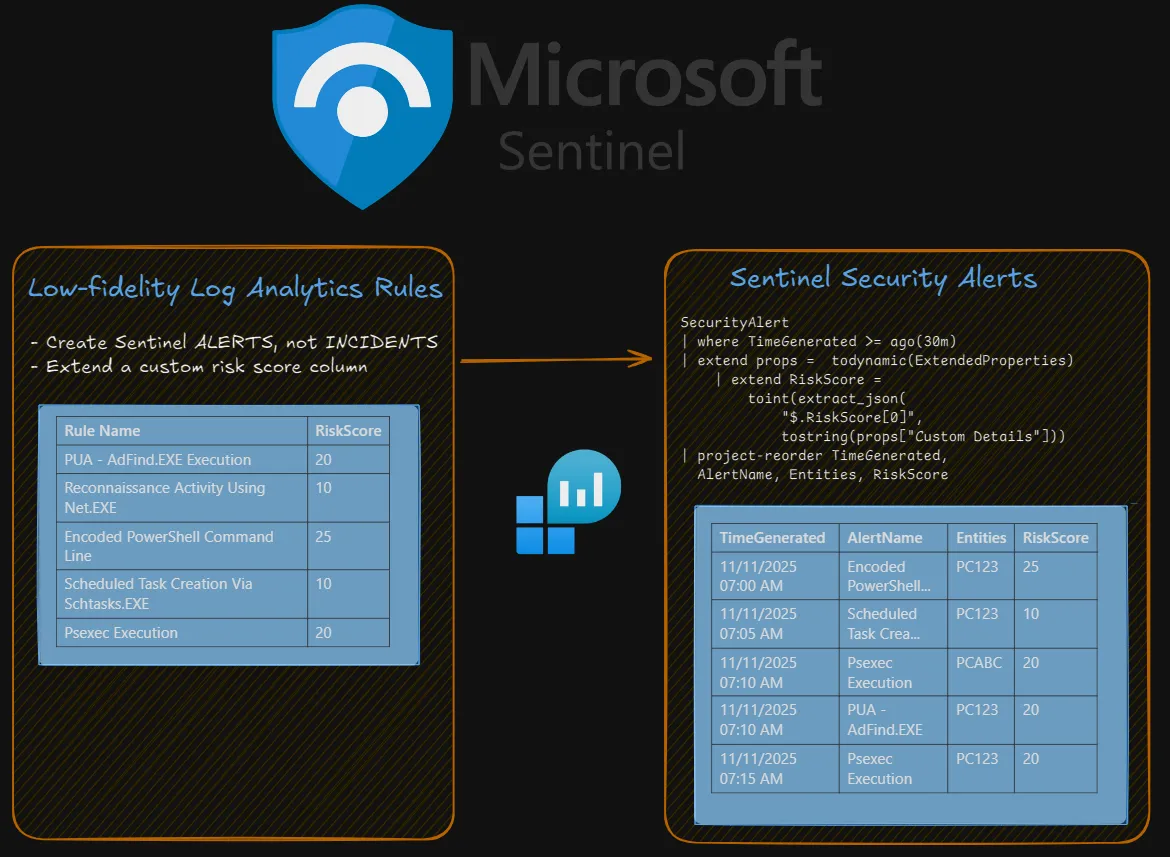
Below, I’ve included an ARM template for a simple rule that triggers upon the execution of AdFind, as determined by Sysmon event ID 1, using this wonderful parser from Edoardo Gerosa for Sysmon logs that live in the SecurityEvent table.
The key items I want to highlight are:
- Never forget to map your observables (e.g., hostnames) appropriately as entities. Without entity mapping, there is no risk-based alerting, as entities are how we’ll be writing RBA detection rules.
- I assigned a risk score of 20 the execution of AdFind. How you score something like this is up to you. I’ve included some thoughts and guidance on risk scoring (as well as risk modifiers) later in this article.
- I created a custom detail called RiskScore with a value of what is in the RiskScore column. It is critically important to parse this out as a custom property, as it is the easiest way to extract it.
{
    "$schema": "https://schema.management.azure.com/schemas/2019-04-01/deploymentTemplate.json#",
    "contentVersion": "1.0.0.0",
    "parameters": {
        "workspace": {
            "type": "String"
        }
    },
    "resources": [
        {
            "id": "[concat(resourceId('Microsoft.OperationalInsights/workspaces/providers', parameters('workspace'), 'Microsoft.SecurityInsights'),'/alertRules/9fef9085-6b6b-4e94-a531-8d8c3536651c')]",
            "name": "[concat(parameters('workspace'),'/Microsoft.SecurityInsights/9fef9085-6b6b-4e94-a531-8d8c3536651c')]",
            "type": "Microsoft.OperationalInsights/workspaces/providers/alertRules",
            "kind": "Scheduled",
            "apiVersion": "2023-12-01-preview",
            "properties": {
                "displayName": "PUA: AdFind",
                "description": "Detects the execution of potentially unwanted application AdFind, a tool that can be used for Active Directory enumeration.",
                "severity": "Low",
                "enabled": true,
                "query": "Sysmon\r\n| where EventID == \"1\"\r\n| where file_name =~ \"adfind.exe\"\r\n| extend RiskScore = 20\r\n| project-reorder TimeGenerated, EventID, Computer, process_command_line, process_parent_command_line, hash_sha1, technique_name",
                "queryFrequency": "PT5M",
                "queryPeriod": "PT10M",
                "triggerOperator": "GreaterThan",
                "triggerThreshold": 0,
                "suppressionDuration": "PT5H",
                "suppressionEnabled": false,
                "startTimeUtc": null,
                "tactics": [
                    "Discovery"
                ],
                "techniques": [
                    "T1018",
                    "T1069",
                    "T1087",
                    "T1482"
                ],
                "subTechniques": [
                    "T1069.002",
                    "T1087.002"
                ],
                "alertRuleTemplateName": null,
                "incidentConfiguration": {
                    "createIncident": false,
                    "groupingConfiguration": {
                        "enabled": true,
                        "reopenClosedIncident": false,
                        "lookbackDuration": "PT5H",
                        "matchingMethod": "Selected",
                        "groupByEntities": [
                            "Host"
                        ],
                        "groupByAlertDetails": [],
                        "groupByCustomDetails": []
                    }
                },
                "eventGroupingSettings": {
                    "aggregationKind": "SingleAlert"
                },
                "alertDetailsOverride": {
                    "alertDisplayNameFormat": "PUA Execution: AdFind",
                    "alertDescriptionFormat": "The frequently-abused application, AdFind, capable of reconnaissance and enumeration, executed on {{Computer}}  with command line {{process_command_line}} ",
                    "alertDynamicProperties": []
                },
                "customDetails": {
                    "RiskScore": "RiskScore"
                },
                "entityMappings": [
                    {
                        "entityType": "Host",
                        "fieldMappings": [
                            {
                                "identifier": "HostName",
                                "columnName": "Computer"
                            }
                        ]
                    },
                    {
                        "entityType": "Account",
                        "fieldMappings": [
                            {
                                "identifier": "Name",
                                "columnName": "user_name"
                            }
                        ]
                    },
                    {
                        "entityType": "FileHash",
                        "fieldMappings": [
                            {
                                "identifier": "Value",
                                "columnName": "hash_sha1"
                            }
                        ]
                    },
                    {
                        "entityType": "Process",
                        "fieldMappings": [
                            {
                                "identifier": "CommandLine",
                                "columnName": "process_command_line"
                            },
                            {
                                "identifier": "ProcessId",
                                "columnName": "process_id"
                            },
                            {
                                "identifier": "CreationTimeUtc",
                                "columnName": "TimeGenerated"
                            }
                        ]
                    },
                    {
                        "entityType": "Process",
                        "fieldMappings": [
                            {
                                "identifier": "CommandLine",
                                "columnName": "process_parent_command_line"
                            },
                            {
                                "identifier": "ProcessId",
                                "columnName": "process_parent_id"
                            }
                        ]
                    }
                ],
                "sentinelEntitiesMappings": null,
                "templateVersion": null
            }
        }
    ]
}
Next, you should create at least a few more rules of this sort for your own telemetry sources. For example, if you have MDE, I would expect that you would prefer to write your rules using MDE tables instead of Sysmon. You can use my previous rule as a template/reference point for how to configure additional rules.
Finally, we need to create our proper risk-based alerting rule. Before I share the ARM template, I’ll cover important bits from the raw KQL:
let RBAAlerts =
    SecurityAlert
    | where TimeGenerated >= ago(1h)
    | extend props =  todynamic(ExtendedProperties)
    | extend KqlToRun = split(props["Query"], "// The query_now parameter represents the time (in UTC) at which the scheduled analytics rule ran to produce this alert.", 1)[0]
    | extend AnalyticRuleId = extract_json("$[0]", tostring(props["Analytic Rule Ids"]))
    | extend AnalyticRuleName = tostring(props["Analytic Rule Name"])
    | extend RiskScore =
        toint(
            extract_json(
            "$.RiskScore[0]",
            tostring(props["Custom Details"])
            )
        )
    | mv-expand e = todynamic(Entities)
    | extend EntityType = tostring(e.Type)
    | extend EntityId = case (
                        EntityType == "account",
                        (coalesce(tostring(e.Name), tostring(e.AadUserId), tostring(e.Sid))),
                        EntityType == "host",
                        (coalesce(tostring(e.HostName), tostring(e.AzureID))),
                        EntityType == "ip",
                        tostring(e.Address),
                        tostring(e.Name)
                    )
    | extend AlertTime = TimeGenerated
    | project-away TimeGenerated
    | where isnotempty(EntityId);
let EntityRisk =
    RBAAlerts
    | distinct EntityType, EntityId, RiskScore, AnalyticRuleId, AnalyticRuleName
    | summarize TotalRiskScore = sum(RiskScore) by EntityType, EntityId;
EntityRisk
| where EntityType == "host"
| where TotalRiskScore >= 50
| join RBAAlerts on EntityId, EntityType
| project-rename AlertRiskScore = RiskScore
| project-reorder TotalRiskScore, AlertTime, EntityType, EntityId, AlertName, Description, AlertRiskScore, Tactics, KqlToRun
| project-away e, EntityType1, EntityId1- To help analysts work faster, I extracted the KqlToRun property for copying and pasting from the ExtendedProperties item of the SecurityAlert table, removing the built-in junk comment from Sentinel. It frustrates me that’s not better natively accessible.
- For three major entity types (as you build out your RBA program, you’ll likely identify different entity types you wish to work with), I assign an EntityId based on the most preferable identifier. For example, when working with an account entity, I first prefer the “name” property (as that’s generally the most basic, simple, and friendly identifier), then choose AadUserId or Sid, if available. For a more sophisticated operation, you might prefer to work with explicitly strong identifiers, as defined by Microsoft.
- IMPORTANT - I get a distinct listing of analytic rules per entity type + ID. In effect, this means that if the same analytics rule fires over and over for a single entity, it will not increase the score. This is a deliberate design decision that you can opt against, but I encourage. To illustrate why, consider the following example:
- Bob has AdFind on his computer. He runs it five times with the incorrect syntax. Does this really warrant a super high risk score?
- If you consider repeated occurrences of something to be particularly significant, you could simply create a new detection rule that triggers on repeated occurrences. If you do this, you can also set a separate risk score.
- Towards the end of the KQL, I specify
| where EntityType == "host". This is because I want this detection rule scoped specifically to hosts. You don’t have to do this. You could try to have a single monolithic rule that accounts for all entity types, though it becomes more difficult to account for undesired alert/incident aggregation behavior if you do so. I find that 95% of actual threats are scoped to a per-endpoint or per-identity basis, and, thus, would recommend you start with separate rules for those two entity types. - After the alert logic’s criteria (
TotalRiskScore >= 50) are met, I join the alerts (RBAAlerts) that comprise our eventual detection criteria on the entity ID and type. For providing context to analysts as fast as possible, this is critically important!
And here’s the ARM template:
{
    "$schema": "https://schema.management.azure.com/schemas/2019-04-01/deploymentTemplate.json#",
    "contentVersion": "1.0.0.0",
    "parameters": {
        "workspace": {
            "type": "String"
        }
    },
    "resources": [
        {
            "id": "[concat(resourceId('Microsoft.OperationalInsights/workspaces/providers', parameters('workspace'), 'Microsoft.SecurityInsights'),'/alertRules/7ab45b80-92fb-4629-bb7d-36bdc57bf77a')]",
            "name": "[concat(parameters('workspace'),'/Microsoft.SecurityInsights/7ab45b80-92fb-4629-bb7d-36bdc57bf77a')]",
            "type": "Microsoft.OperationalInsights/workspaces/providers/alertRules",
            "kind": "Scheduled",
            "apiVersion": "2023-12-01-preview",
            "properties": {
                "displayName": "RBA - Host Low Risk Threshold Exceeded",
                "description": "Provide an alert when a host's risk score exceeds the minimum threshold for a low-severity alert.",
                "severity": "Low",
                "enabled": true,
                "query": "let RBAAlerts = \r\n    SecurityAlert\r\n    | where TimeGenerated >= ago(1h)\r\n    | extend props =  todynamic(ExtendedProperties)\r\n    | extend KqlToRun = split(props[\"Query\"], \"// The query_now parameter represents the time (in UTC) at which the scheduled analytics rule ran to produce this alert.\", 1)[0]\r\n    | extend AnalyticRuleId = extract_json(\"$[0]\", tostring(props[\"Analytic Rule Ids\"]))\r\n    | extend AnalyticRuleName = tostring(props[\"Analytic Rule Name\"])\r\n    | extend RiskScore =\r\n        toint(\r\n            extract_json(\r\n            \"$.RiskScore[0]\",\r\n            tostring(props[\"Custom Details\"])\r\n            )\r\n        )\r\n    | mv-expand e = todynamic(Entities)\r\n    | extend EntityType = tostring(e.Type)\r\n    | extend EntityId = case (\r\n                        EntityType == \"account\", \r\n                        (coalesce(tostring(e.Name), tostring(e.AadUserId), tostring(e.Sid))),\r\n                        EntityType == \"host\",\r\n                        (coalesce(tostring(e.HostName), tostring(e.AzureID))),\r\n                        EntityType == \"ip\",\r\n                        tostring(e.Address),\r\n                        tostring(e.Name)\r\n                    )\r\n    | extend AlertTime = TimeGenerated\r\n    | project-away TimeGenerated\r\n    | where isnotempty(EntityId);\r\nlet EntityRisk =\r\n    RBAAlerts\r\n    | distinct EntityType, EntityId, RiskScore, AnalyticRuleId, AnalyticRuleName\r\n    | summarize TotalRiskScore = sum(RiskScore) by EntityType, EntityId;\r\nEntityRisk\r\n| where EntityType == \"host\"\r\n| where TotalRiskScore >= 50\r\n| join RBAAlerts on EntityId, EntityType\r\n| project-rename AlertRiskScore = RiskScore\r\n| project-reorder TotalRiskScore, AlertTime, EntityType, EntityId, AlertName, Description, AlertRiskScore, Tactics, KqlToRun\r\n| project-away e, EntityType1, EntityId1",
                "queryFrequency": "PT30M",
                "queryPeriod": "PT1H",
                "triggerOperator": "GreaterThan",
                "triggerThreshold": 0,
                "suppressionDuration": "PT5H",
                "suppressionEnabled": false,
                "startTimeUtc": null,
                "tactics": [],
                "techniques": [],
                "subTechniques": [],
                "alertRuleTemplateName": null,
                "incidentConfiguration": {
                    "createIncident": true,
                    "groupingConfiguration": {
                        "enabled": true,
                        "reopenClosedIncident": false,
                        "lookbackDuration": "PT5H",
                        "matchingMethod": "Selected",
                        "groupByEntities": [
                            "Host"
                        ],
                        "groupByAlertDetails": [],
                        "groupByCustomDetails": []
                    }
                },
                "eventGroupingSettings": {
                    "aggregationKind": "SingleAlert"
                },
                "alertDetailsOverride": {
                    "alertDisplayNameFormat": "RBA - Host Low Risk Threshold Exceeded for {{EntityId}} ",
                    "alertDescriptionFormat": "{{EntityId}} has exceeded the low risk threshold, accumulating a risk score of {{TotalRiskScore}}. ",
                    "alertDynamicProperties": []
                },
                "customDetails": {},
                "entityMappings": [
                    {
                        "entityType": "Host",
                        "fieldMappings": [
                            {
                                "identifier": "HostName",
                                "columnName": "EntityId"
                            }
                        ]
                    }
                ],
                "sentinelEntitiesMappings": [
                    {
                        "columnName": "Entities"
                    }
                ],
                "templateVersion": null
            }
        }
    ]
}
Testing out Risk-Based Alerting
To test the risk-based alerting rule, I ran the following actions that, in isolation, are generally not meaningful and not worth alerting on, but when performed in quick succession, are much more interesting:
- Ran AdFind to perform Active Directory enumeration
- Ran a base64-encoded PowerShell command
- Created a scheduled task to establish persistence
- Ran PsExec to perform activity on a remote host
- Enumerated administrative groups using
net.exe
The results? Not bad!
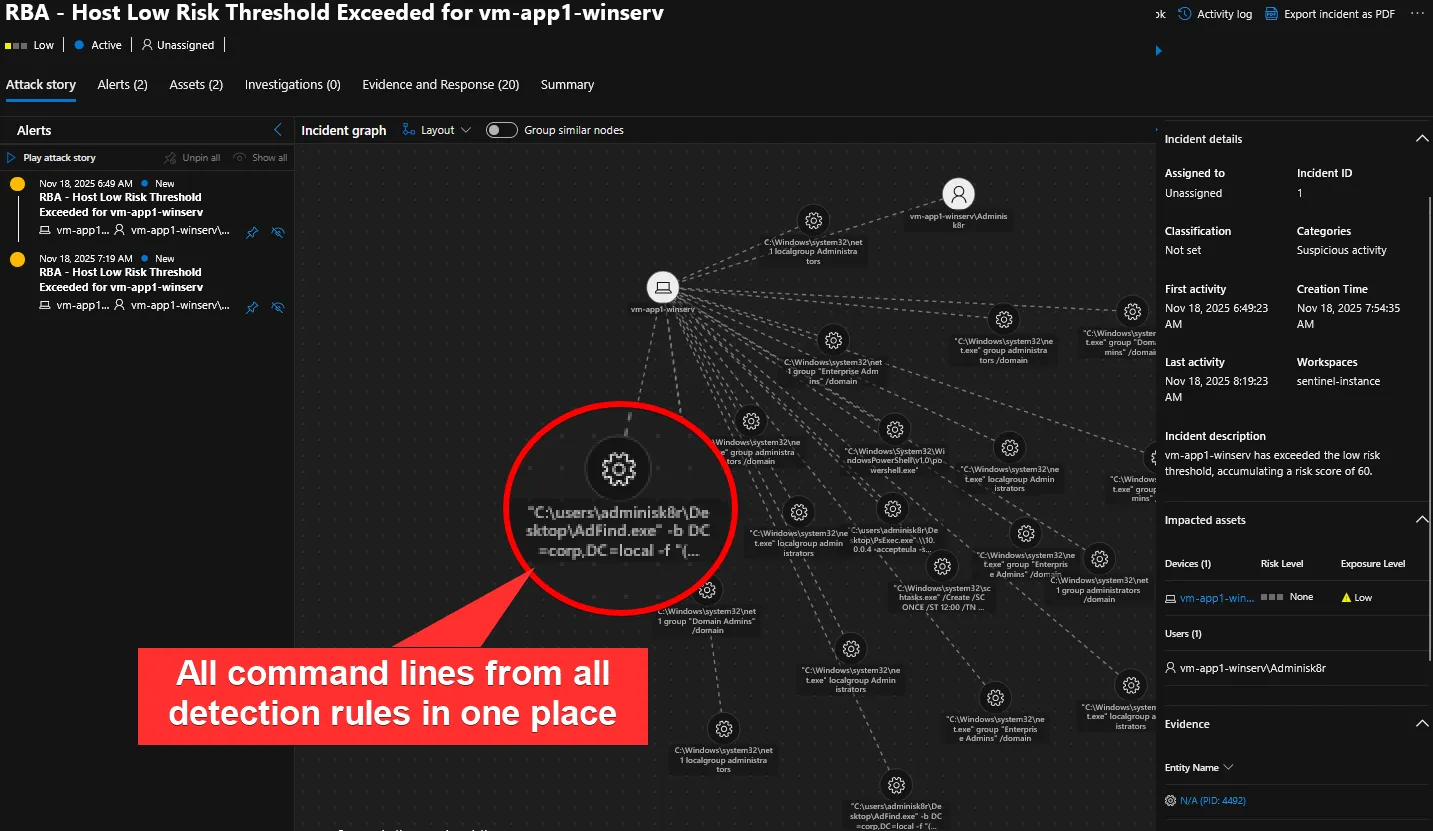
Clicking into an individual “alert”, because we joined on RBAAlerts in our KQL query, an analyst can quickly see all the low-fidelity alerts (alertception) that comprise the creation of our incident investigation. When combined with the process entities, in just a few seconds, they can see exactly what was happening on the endpoint that warranted additional scrutiny!
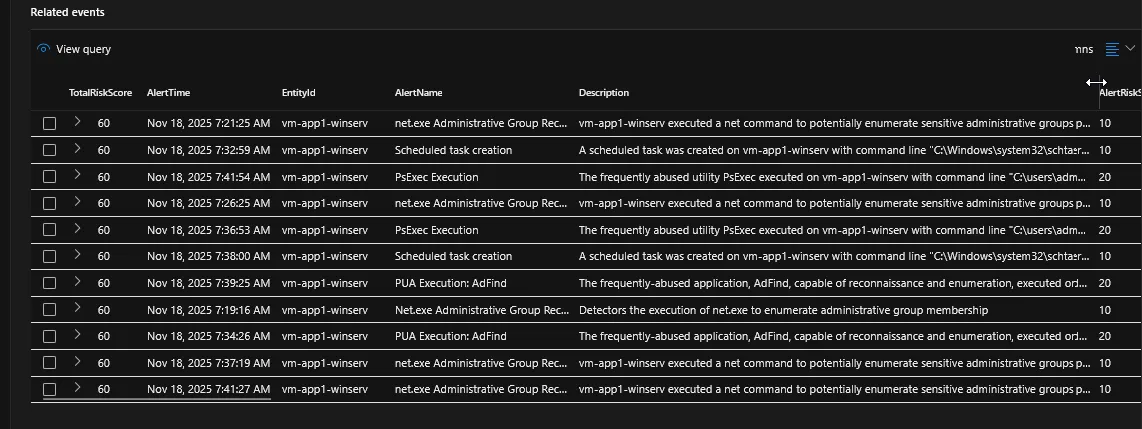
From here, an analyst can pivot to something like the MDE device timeline or an investigative workbench like a Sentinel Workbook, armed with the context they need to succeed.
But that’s not all. You can actually incorporate these alerts into an investigative workbench. I liken this to pre-running a tool like Hayabusa to provide us with a “layer” or meaningful signal over the noise of raw telemetry. Trying to decipher what happened in a sea of unfiltered process creations, network connections, API calls, and so on, is like finding a thousand needles, one at a time, in the world’s largest haystack. But a timeline composed entirely of alerts of “interesting activity”? You might be able to provide a high-level summary of “what happened” without a single pivot or additional query.
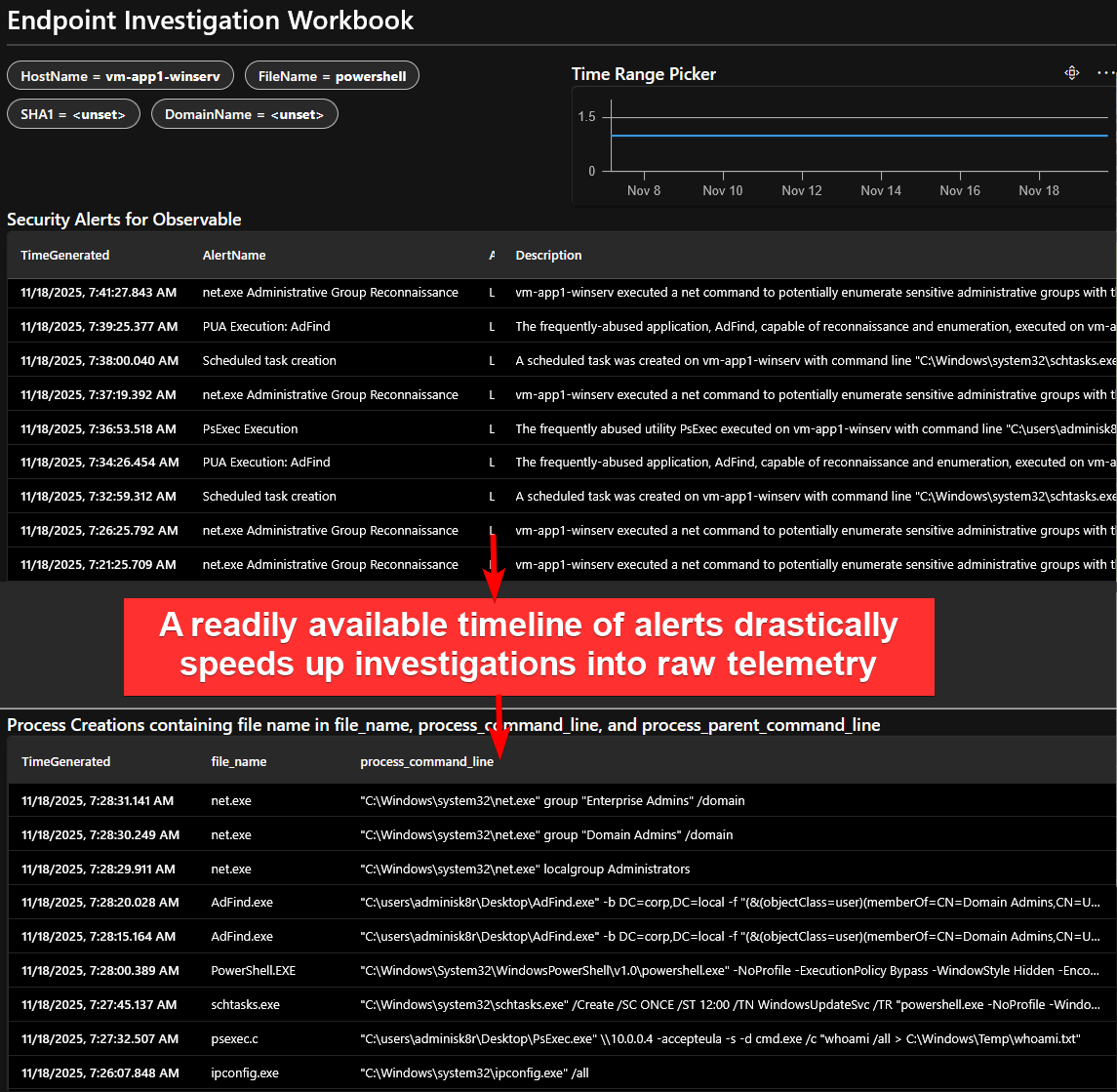
In this sample simple investigative workbench, built using a Workbook, an analyst can filter to their time range of interest and see all activity, including alerts, pertinent to an observable, like a hostname or a file name.
Risk Scoring
How you determine a “risk” score is up to you. You can/should consider at least the following factors:
- Criticality of system/user
- Severity of impact
- Likelihood/confidence
- Anomalousness
In a talk on risk-based alerting given at Splunk’s .conf conference in 2018, Jim Apger and Stuart McIntosh presented the following formula:
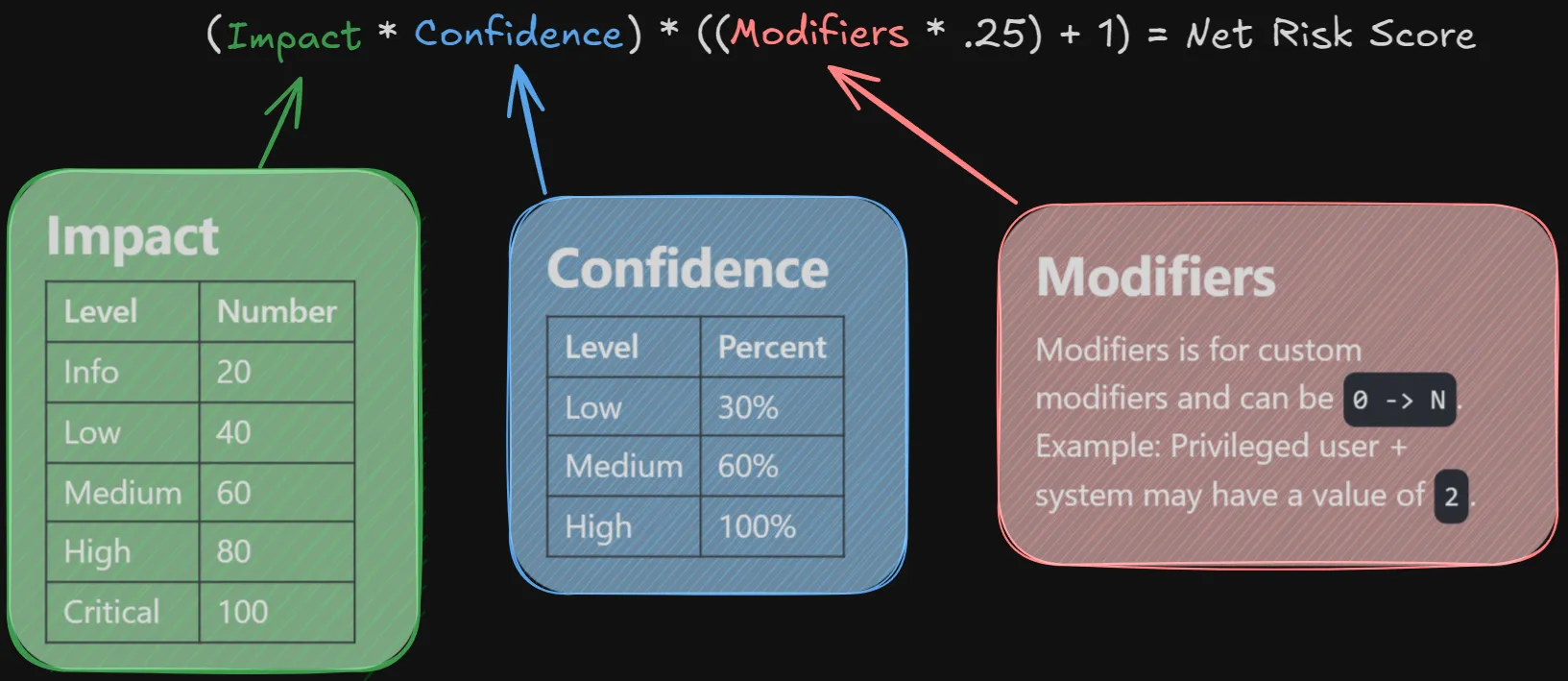
This isn’t a bad formula. As an example, consider an alert that fired on a domain controller (critical severity with a score of 100) that is highly probable to represent malicious activity (100% confidence) occurring on a privileged user and system. This would result in a net risk score calculation of: (100 * 1) * ((2 * .25) + 1) = 150.
Personally, I would recommend a formula that places a significantly higher premium on confidence over impact/severity. I find SOC outcomes are nearly universally better when prioritization is placed on what likely constitutes a threat (e.g., explorer.exe-spawned encoded PowerShell on an accountant’s workstation ) as opposed to the potential severity of an alert (e.g., an alert for authentication errors on, gasp, a domain controller).
You’ll have to play with formula creation to find out what works for you. Ultimately, the goal is to never be alerted to something unless a specific threshold is met. If you can come up with the threshold, you can figure out the formula and what should be expected for constants and constraints for impact, confidence, and modifiers fairly easily.
Likelihood
Likelihood — your level of confidence — is very hard and very important to get right. And, if some new software or process is brought into an environment, the likelihood that a detection rule represents the presence of a threat can change drastically overnight.
If you’re going to work hard on having anything adjust dynamically, I think it should be the likelihood associated with a detection rule. A starting point that is by no means an ending point to this task is as follows:
- In the case management system, whenever an alert involving a particular detection rule is closed out as not representing a threat, reduce the confidence score for that detection rule by 1. This could be as simple as subtracting 1 from a “confidence” property in a database table containing detection rule metadata. Conversely, if a detection rule does translate to a threat, its confidence could be increased by something like 5.
- On a recurring scheduled job basis, using a CI/CD pipeline, invoking something like Terraform or ARM templates, re-deploy detection rules with risk scores based on the updated confidence level.
Modifiers
A common core component of risk-based alerting is the ability to dynamically adjust risk scores based on the risk associated with a particular observable. For example, you might want to attribute more risk to a contractor account that may be subject to different levels of scrutiny than the rest of your user base.
In my starter Sentinel implementation demo, I did not touch on modifiers. They can have a bit of nuance to implement, depending on what data sources you have available to you and what data normalization processes you might have to undertake in your queries. I also find that they are secondarily valuable to the risk associated with particular behaviors. After all, a malicious behavior is malicious, no matter what endpoint or identity it pertains to.
For an example of applying a modifier to identify contractor accounts as more risky than others, assume that you have the following data source available to you and invokable via UserInfo. This can be derived from your CMDB and made available either through a true table or through a Workspace Function.
| UserName | JobTitle | AccountType |
|---|---|---|
| system | Built-in system admin privilege account | Service Account |
| jhenry | System Administrator | Employee |
| nmapes | IT Consultant | Contractor |
Then, for a detection rule like the one to identify AdFind execution, instead of assigning a static risk score, you can build it using the example formula from the Splunk conference with the new modifier attached:
let Impact = 20;
let Confidence = 1.0;
Sysmon
| where EventID == "1"
| where file_name =~ "adfind.exe"
| extend SlashIndex = indexof(user_name, "\\")
| extend UserName = tolower(iff(SlashIndex == -1, // -1 when no slash in username field
                        user_name,
                        substring(user_name, SlashIndex + 1))) // extract user name, separate from domain/machine name
| join kind=leftouter UserInfo on UserName
| extend Modifier = iff(AccountType == "Contractor", 1, 0)
| extend RiskScore = ((Impact) * (Confidence)) * (((Modifier) * 0.25) + 1)
| project-reorder TimeGenerated, EventID, file_name, UserName, JobTitle, AccountType, RiskScore, hash_sha1, technique_name
In this case, for a non-contractor executing AdFind, the RiskScore will evaluate to 20. For a contractor, through the modifier, it will evaluate to 25. Very cool!
Risk-Based Alerting For Everything?
Risk-based alerting is an excellent way to reduce noise, increase fidelity, and expand detection coverage in security operations. But it doesn’t come without drawbacks.
Implementation is not profoundly simple in Sentinel (or much else, for that matter). You have to deal with a fair bit of data wrangling and have to accept tradeoffs instead of endless win/wins.
Real-time alerting can be difficult to implement with risk-based alerting. Depending on the implementation details of how frequently you evaluate risk, you might not surface “extremely scary” things (e.g., ransomware file modifications) until later than you’d prefer.
RBA also doesn’t completely eliminate the need for tuning. A poorly-tuned detection rule runs the risk of “poisoning” net risk scores across the board, arbitrarily raising the minimum observed risk on a per-observable basis. Additionally, as detection rule coverage increases, either your existing risk scores or your thresholds for alerting may need to be adjusted. And that can come with unintended side effects, such as not alerting on observable subtypes (e.g., Linux endpoints vs. Windows endpoints) when your detection rule coverage for one significantly surpasses coverage for the other.
Ultimately, yes, risk-based alerting is good. Profoundly so. But there are nuances to consider. And for detection rules that are already known to be high-fidelity (e.g., ransomware file modifications) or require very timely attention, it can be best to create basic, non-risk-based rules.
The Future of Risk-Based Alerting in Microsoft Sentinel
Recently, Microsoft unveiled custom detection rules. They have some really great features. In particular, I love that you can group events into a single alert when certain properties match. That’s going to be a huge deal for preventing undesired aggregation in noisy environments and MDR organizations. Unfortunately, custom detections do not have complete feature parity with analytics rules. Of particular concern is the lack of support for creating alerts without incidents (and no indication for future support). Because that is the the entire basis for risk-based alerting in this article, that means, effectively, this flavor of RBA would require some major reworking.
I do not think this means analytics rules are dead in Sentinel. In Microsoft’s FAQ, they indicate the following:
Q: Should I stop using analytics rules? A: While we continue to build out custom detections as the primary engine for rule creation across SIEM and XDR, analytics rules may still be required in some use cases. You are encouraged to use the comparison table in our public documentation to decide if analytics rules is needed for a specific use case. No immediate action is necessary for moving existing analytics rules to detection rules.
“No immediate action is necessary,” to me, reads as, “action will eventually be necessary.” Still, they acknowledge that analytics rules have specific use cases. It is possible that they will one day add the ability to alert on activity without producing an incident, if customers demand it. Alternatively, they may simply bake a better solution for RBA into custom detections. And I don’t think analytics rules are going away any time soon. The Defender XDR portal becoming the “home” of Sentinel was announced an extremely long time ago, and is still a long way from true completion. So, I would still look into RBA in Microsoft Sentinel if you are interested in the increase in fidelity and reduction in noise it can bring.
What about Defender’s “Priority Score”?
In the Defender XDR incident queue, incidents now feature a “priority score.” It’s an attempt at a step in the right direction. Per Microsoft, the algorithm that drives this score factors in:
- Attack disruption signals
- Threat analytics
- Severity
- SnR
- MITRE techniques
- Asset criticality
- Alert types and rarity
- High profile threats such as ransomware and nation-state attacks.
Obviously, I think that stepping away from a blanket “severity” as the only way prioritize an investigation is a laudable decision. And, clearly, Microsoft is trying to factor in some risk factors into their prioritization score. Still, there are issues with the current implementation.
- Priority score calculation is suboptimal - I’ve observed recurring, benign platform deployment scripts be elevated to a prioritization score of 100 because they use
net.exeto add an account to the local administrators group. - Priority score doesn’t actually prevent low-fidelity incidents from being generated; it just rearranges them. If Microsoft wants the Defender XDR portal to be the be-all, end-all case management platform (they do), having junk in the incident queue is not an acceptable outcome.
- The ability to define/adjust the priority score yourself with analytics rules is extremely limited.
In all, I’m not holding my breath for prioritization to solve RBA. It might be worth revisiting in a few years, though.